A personal task tracker
I wanted to experience the entire product development lifecycle from multiple perspectives, master AI tools, and solve a personal task management problem.
Problem Identification
As a productivity enthusiast, I’ve tried all kinds of task trackers, from the standard Apple Reminders to Notion and Obsidian. They all suffered from the same fundamental flaw: every time I start using an app, it works initially, but over time it becomes a burden that drains your time instead of saving it.
You either abandon Obsidian, or maintaining it becomes an end in itself.
My desire to solve the problem of personal task management coincided with the boom in AI tools. In the spring of 2025, when bolt.new announced a hackathon and provided free access to its platform, it became the perfect trigger for my project.
Since I already had the development experience to build the app without AI, I used it as a coding accelerator — rather than a magic wand that does everything for me.
First Prototype
The first thing I wanted to figure out was whether AI itself is the solution to the problem. I decided to take a classic task tracker architecture (tasks, projects, calendar) and add an assistant.
- You chat with the AI, for example, about which countries to visit.
- You tell it to plan a vacation to that country.
- Based on your existing activity, it generates and shows a list of tasks.
- You refine or confirm it.
- It creates the project and task list.
For this prototype, I used the OpenAI API. It was my first experience integrating AI.
The Result
AI automated about 15% of the work and made the interaction pretty smooth. It's no surprise that Notion later integrated similar features. However, this feature felt more like a nice bonus for a personal task tracker, rather than the core reason why I struggled with other apps.
Even though I could control the app entirely through AI input, 80% of the time I still used the standard interface simply because it was more efficient. The root of the problem lay elsewhere — its nature was architectural, not technical. I needed to dig deeper.
Second Prototype
I analyzed which actions in task trackers took up most of my time. Using self-reflection as a substitute for user interviews, I concluded that for 80% of tasks, I don't need exact times. Simply ordering them sequentially is enough. Even though drag-and-drop is easy in most calendars, every task that took longer or finished early triggered me to manually move the rest of the tasks to keep the calendar updated. Otherwise, it just increased the cognitive load of constantly recalculating the schedule in my head.
So, for the next version of the task tracker, I wanted to minimize this wasted time by making tasks rearrange automatically. The basic user flow looked like this:
- You create a project.
- You create tasks within that project.
- You prioritize the task list.
- You create time slots for the project.
- You distribute the project slots across the week.
- Tasks are automatically distributed into these slots.
- If you change one task, the rest adjust automatically.
The result
There were way more problems with this version than with the first one. After a quick test, it became clear that it added a ton of cognitive load.
If you want to see a task on a specific day, you have to figure out which past and future tasks to swap and how to adjust their durations. This forces the user to keep their calendar 100% updated at all times. It makes the experience frustrating, and maintaining the calendar becomes an end in itself.
To see a brand new task on the calendar, you have to create a project slot first, and only then will it fit.
You could come up with different workarounds, but the core concept just didn't feel solid or intuitive.
Key Takeaways from the Second Prototype
The system sped up task refactoring by 100% (tasks rearranged themselves completely). However, this concept made the task creation process so complicated that it killed all the benefits. In other words, we successfully optimized the metric, but the metric itself — "reducing task refactoring time" — turned out to be the wrong goal.
I discovered a clear paradox: the more aggressively the system automated task rescheduling, the less I actually wanted to use it. I tested Reclaim — a popular AI-driven calendar app — around the same time and came to the exact same conclusion. When AI completely takes over the micro-management of your schedule, you lose the feeling of control, and the tool starts dictating your day rather than assisting it.
Even though this version turned out to be the biggest failure, pushing the concept to the absolute edge case helped me uncover a few key patterns. Without them, I wouldn't have been able to build the third version — the successful one that is already live on the market.
The Final Prototype
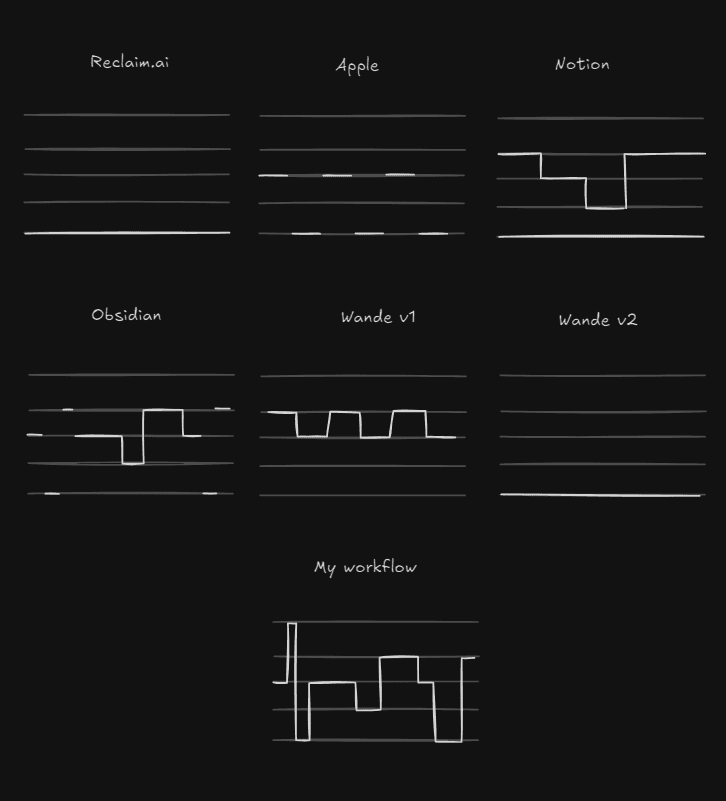
After the failure of the second version, I mapped out a satisfaction rating for every task tracker I had ever used.
Measuring satisfaction is tricky. At first, I thought 'time spent using the app' would be a good metric, but that unfairly penalizes newer tools like my own or Reclaim. Furthermore, apps like Notion and Obsidian are primarily knowledge bases, not just task trackers. To fairly evaluate them, I had to deliberately isolate my 'task management' experience from my 'note-taking' experience.
6
Notion
8
Obsidian
3
Apple
4
Wande-v1
2
Reclaim.io
2
Wande-v2
I noticed a clear pattern: I was significantly more satisfied with tools that offered multiple ways to manage tasks.
It was incredibly helpful to visualize how different products perceived my workflow versus how it actually looks in reality.
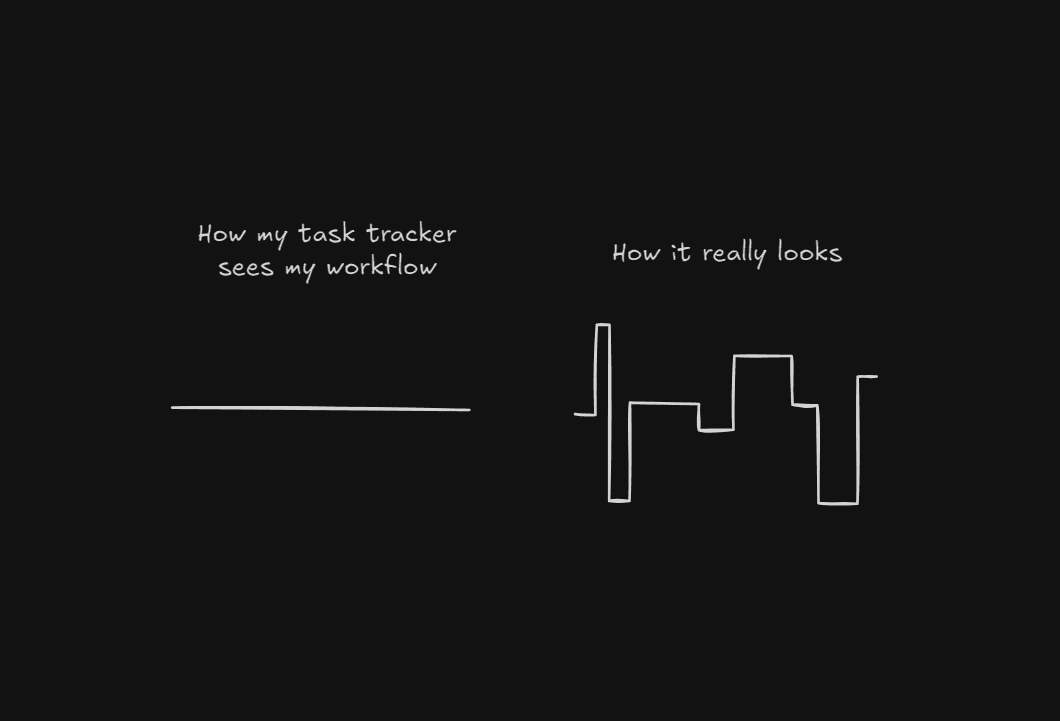
I broke down this abstract "workflow graph" into 5 core levels of activity:
- Level 0: Mental tracking. A single, massive, straightforward task. I can easily hold it in my head, and it doesn't require detailed tracking (e.g., spending a month writing a thesis or doing daily routine work). No task tracker needed.
- Level 1: A simple list. A sequence of clear, manageable tasks (e.g., buy groceries, find references, draft a text). A basic to-do list is sufficient.
- Level 2: Parallel projects. When multiple streams of life overlap, like juggling work deadlines with planning a major apartment move or a big trip. A single list becomes messy. Tasks need to be categorized into distinct projects.
- Level 3: Time-blocking and fragmentation. Working on multiple projects simultaneously. You can't literally do two things at once, so tasks must be broken down and scheduled across days. While waiting for feedback on one task, you slot in another (e.g., "I'll work on the landing page Tuesday morning and all day Saturday").
- Level 4: High-density scheduling. This isn't for an isolated sync call or a doctor's appointment (Level 3 handles those fine). This is for days packed with back-to-back, time-bound events. For example, attending a multi-day design conference like Figma Config, where you need to navigate specific lectures, workshops, and networking sessions hour by hour. For this level of temporal density, you absolutely need the spatial awareness of a full calendar grid.
The Core Insight
At first glance, tools like Obsidian and Notion seem to cover these needs reasonably well. Looking at their satisfaction scores, it wasn’t immediately obvious what caused the friction that pushed me to design new trackers over and over again.
Then it hit me: supporting every workflow is a necessary, but not sufficient, condition. The fluidity of the transition between these workflows is just as critical. This is how I formulated the vision for my tracker:
The ideal task tracker is one that accommodates all workflow states, allowing the user to seamlessly switch between them with zero effort or just a single click.
Most task trackers on the market just repackage the same core mechanics with a trendier UI. They are like single-gear cars: they perform perfectly within a specific speed range, but stall completely when you shift context.
This hypothesis turned out to be the winning one.
The Result
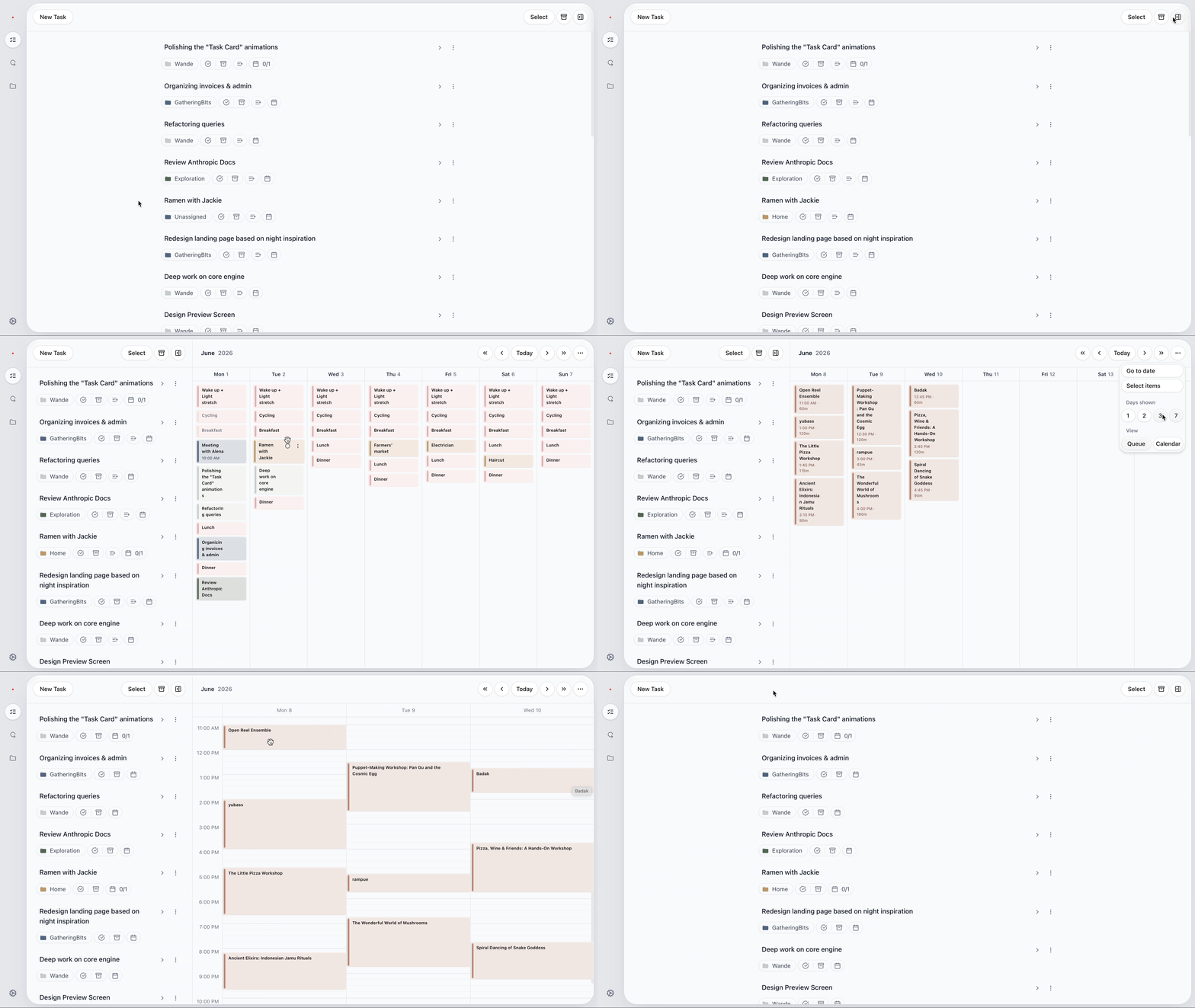
For the past two months, I’ve been using this tool myself, and I am 100% satisfied with its architecture. The project is currently in beta testing. Even though it's still a bit raw in the details, it already has its first real users.
I've gained more hands-on experience building this than in my entire 7-year professional career combined. I got to see the project from every possible angle — technical constraints, product decisions. I leveled up my prioritization skills like never before (e.g., choosing between real-time updates and offline mode, or deciding between a quick Google OAuth and a custom email/password login). I dove deep into the tech side, even handling database migrations between providers with a small, but active, live user base relying on the app.
Most importantly, by mastering AI tools, I learned how to build actual, working products faster than I used to make static prototypes in Figma. I can't wait to apply these new skills to my professional work.
I'm not aiming for massive commercial success with Wande. There's a huge gap between knowing how to build a product and wanting to aggressively market it. My goal is to slowly grow it organically, build a tight-knit community of maybe 500 active users, and maintain it sustainably. For now, I'm just excited to take all these learnings into my next project.